 Seth0x41
Last time, we talked about Buffers. This time, we will talk about Channels and how both together will lead you to high performance in I/O Operations.
What are Channels?
A channel is an object that represents an open connection to a file, a network socket, an application component, a hardware device, or any other entity capable of performing Read/Write Operations.


Channels transfer data efficiently between byte buffers and the actual resources managed by the OS, such as the hard disk or the network card.
If you notice, in both Read and Write operations, the endpoints receiving or sending data use Byte Buffers for this purpose.
Often, there is a one-to-one relationship between a File Handle in Windows or a File Descriptor in Linux and a channel. When dealing with channels in the context of files, channels are usually connected to an open file descriptor. Although channels are considered more abstract than file descriptors, they are still capable of representing the I/O capabilities of the OS.
You can learn more about File Descriptors from this resource:
https://biriukov.dev/docs/fd-pipe-session-terminal/1-file-descriptor-and-open-file-description/
Java supports channels through these packages:
java.nio.channels:
This is the package you will use daily. it contains classes likeFileChannelandSocketChannel; its goal is abstraction for ease of use.java.nio.channels.spi:
This is specifically for people building the Java implementation itself or defining new Selector Providers. You likely won't use it unless you want to build a complex Custom Channel Implementation.
All Channels are instances of classes that implement the interface named java.nio.channels.Channel, which defines these methods:
void close():
Closes this channel. If the channel is already closed, it has no effect. If another thread attempts to call close(), it will block until the first close() call completes, and subsequent calls will have no effect.
This method throws java.io.IOException if an I/O problem occurs. After the channel is closed, any further attempts to perform I/O operations will throw this exception: java.nio.channels.ClosedChannelException.
boolean isOpen():
Returns the state of the channel regarding whether it is open or not. This method returns true if it is open; otherwise, it returns false.
These methods show that there are only two operations shared across all Channels: closing the channel and ensuring whether it is open or not. In reality, this applies the Interface Segregation Principle because a Channel represents just a connection, regardless of whether that connection performs read/write operations.
To support I/O, the channel is extended via interfaces which are:
-
java.nio.channels.WritableByteChannel
Defines an abstract method namedint write(ByteBuffer buffer)which writes a byte sequence from the Buffer to the current channel. This method returns the number of bytes actually written and throwsjava.nio.channels.NonWritableChannelExceptionif the channel was not open for writing,java.nio.channels.ClosedChannelExceptionif the channel is closed,java.nio.channels.AsynchronousCloseExceptionif another thread closes the channel during writing, andjava.nio.channels.ClosedByInterruptExceptionif another thread interrupts the current thread during writing, which causes the channel to close and the interrupted thread's state to becomeinterrupted. It also throwsIOExceptionif any other I/O problem occurs. -
java.nio.channels.ReadableByteChannel:
Defines an abstract method namedint read(ByteBuffer buffer)that reads bytes from the current channel and puts them into the buffer. It returns the number of bytes actually read, or -1 if there are no more bytes to read. It throwsjava.nio.channels.NonReadableChannelExceptionif the channel was not open for reading,ClosedChannelExceptionif the channel is closed,AsynchronousCloseExceptionif another thread closes the channel during reading,ClosedByInterruptExceptionif another thread interrupts the current thread during the reading operation, which causes the channel to close and the interrupted thread's state to becomeinterrupted, andIOExceptionif any other I/O problem occurs.
You can use the instanceof operator to know if a channel instance implements any of these interfaces. Because testing for both can be tedious, Java provided an interface named java.nio.channels.ByteChannel, which is an empty marker interface that inherits from both WritableByteChannel and ReadableByteChannel. Use this when you want to know if the channel is bidirectional, as the other two are typically unidirectional for either reading or writing.
Channels also extend the interface named java.nio.channels.InterruptibleChannel. The InterruptibleChannel describes a channel that can be closed asynchronously and can be interrupted. The interface overrides the close() method found in Channel and adds an additional condition to the contract regarding this method: any thread currently blocked in an I/O operation on this channel will receive an AsynchronousCloseException.
A channel that implements this interface is Asynchronously closeable. So, when a thread is blocked in an I/O operation on an interruptible channel, any other thread can call the close() method of the channel (channel.close()), which causes the blocked thread to receive an instance of AsynchronousCloseException.
A channel that implements this interface is also interruptible. When a thread is blocked in an I/O operation on an interruptible channel, another thread can call the interrupt method of the blocked thread (threadA.interrupt()). Doing this causes the channel to close, and the blocked thread receives an instance of ClosedByInterruptException, and the interrupt status of the blocked thread becomes interrupted.
If a Thread's interrupt status is already set and it calls an I/O operation that blocks on the channel, the channel will close, and the thread will immediately receive an instance of ClosedByInterruptException, while its interrupt status remains set.
NIO designers chose to close the channel when the blocked thread is interrupted because they could not find a way to handle interrupted I/O operations with the same behavior across all operating systems. The only way to guarantee a specific behavior was to close the channel.
You can determine if a channel supports asynchronous closeability and interruption via the instanceof operator in an expression like channel instanceof InterruptibleChannel.
There are two ways to obtain Channels:
- The package named
java.nio.channelsprovides a utility class namedChannelswhich offers methods to obtain channels from streams. In each of these methods, the underlying stream is closed when the channel is closed, and the channel is not buffered:
WritableByteChannel newChannel(OutputStream outputStream)
Returns a writable byte channel for the given outputStream.ReadableByteChannel newChannel(InputStream inputStream)
Returns a readable byte channel for the given inputStream.
- Many classes from classic I/O have been modified to support channel creation. For example,
java.io.RandomAccessFiledefines a method namedFileChannel getChannel()to return a file channel, andjava.net.Socketdefines a method namedSocketChannel getChannel()to return a socket channel.
To make things clearer, we will create a simple example of an echo program using channels.
We will use the Channels class to get a channel for the standard input and output streams, then use them to copy bytes from the input channel to the output channel.
We will write the main method first, defining our channels.
We will use ReadableByteChannel for System.in, representing the input, and WritableByteChannel for System.out, representing the output. We will call a method we'll create named copy responsible for moving the data.
public static void main(String[] args) {

    try (ReadableByteChannel src = Channels.newChannel(System.in);
         WritableByteChannel dest = Channels.newChannel(System.out)) {
        try {
            copy(src, dest);
        } catch (IOException e) {
            System.err.println("I/O Error: " + e.getMessage());
        }
    } catch (IOException e) {
        e.printStackTrace();
    }
}
Now we will implement the copy method.
static void copy(ReadableByteChannel src , WritableByteChannel dest) throws IOException{
    ByteBuffer buffer = ByteBuffer.allocateDirect(2048);
    while (src.read(buffer) != -1){
        buffer.flip();
        dest.write(buffer);
        buffer.compact();
    }
    buffer.flip();
    while (buffer.hasRemaining())
        dest.write(buffer);
}
This method will take our channels, then allocate a Direct buffer (which we discussed along with buffers in detail here). Then it enters this while loop to read the incoming data from the source channel until the end (when read returns -1). Then it flips the buffer so we can extract the data, after which we write it to the dest channel via dest.write(buffer). After writing, we call compact to ensure that if any data remains in the buffer, it is rearranged. After exiting the while loop, we flip again to see if any remaining data from the compact operation needs to be sent.
Before testing the program, let's implement another way to copy, which we'll call copyAlt():
static void copyAlt(ReadableByteChannel src, WritableByteChannel dest) throws  IOException{
    ByteBuffer buffer = ByteBuffer.allocateDirect(2048);
    while (src.read(buffer) != -1) {
        buffer.flip();
        while(buffer.hasRemaining())
            dest.write(buffer);
        buffer.clear();
    }
}
We allocated the same buffer and put data into it through this loop as in the previous method, and we also used flip to extract data. However, there is a difference here—try to notice it yourself first.
If you notice, the way we handle remaining data here is different from the first method. In the first one, it could tolerate data not being taken, opting to compact and handle the remainder outside the loop. But here, the situation is different; it ensures everything is written to dest and the buffer is empty before moving on. In reality, the compact operation is expensive because it internally performs System.arraycopy to move the remaining bytes from the end of the buffer to the beginning, which consumes CPU and memory bandwidth. However, what is special about it is that it is non-blocking ready. Let's imagine a scenario where a server is sending you data from its hard disk, but your internet is not great. First, we read 100 bytes from the server, and the buffer is now full. You received only 5 bytes from this buffer because your internet is slow. Naturally, if we use the copyAlt method, the thread will remain blocked inside the loop waiting for the buffer to finish, so it will keep looping and sending 0 bytes. But in copy, what happens is that as long as 5 were read, it will compact the remaining 95 to the beginning and tell the thread "fill these empty 5 for me," so it won't wait for the network to handle it. The advantage of the copyAlt method is that it is faster because once you finish, you call buffer.clear(), which is since you are just resetting pointers like position and limit without actually deleting or moving data as we discussed before regarding buffers. However, the downside is that it remains hostage to something like the network, as in the example we discussed. Therefore, the optimal use for it is Blocking File I/O, and not using compact will be more efficient since writing to disk is usually fast. However, using compact is better if you are dealing with something like a network socket.
Let's try our code:
java Main.java
This will open an echo; as soon as you type something, it will reply with the same thing. You can also do:
java Main.java < testfile > testfile.bak
This will copy the contents of testfile to testfile.bak. If you try changing copy to copyAlt, the same thing will happen.
A Deeper Step into Channels
The previous discussion was about the channel interface to give you an idea about channels. Now let's look at things like scatter/gather I/O, file channels, socket channels, and pipes.
Scatter/Gather I/O
Channels provide the ability to perform a single I/O operation across multiple buffers. This feature is known as scatter/gather I/O or vectored I/O.
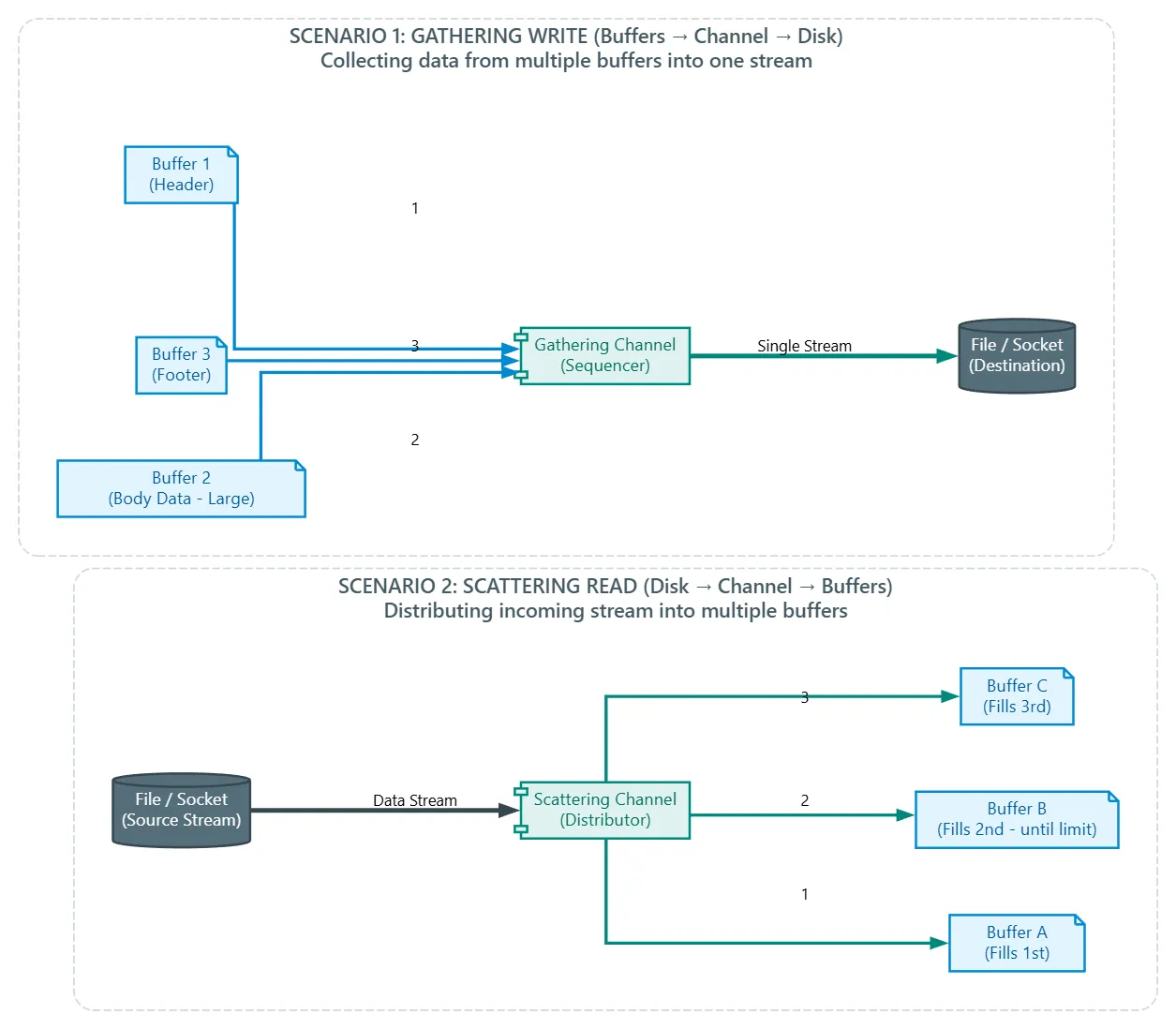
In the context of write operations, the contents of multiple buffers are gathered in order and then sent through a channel to the destination, as shown in the first scenario in the image. These buffers do not necessarily have to have the same capacity.
In the context of read operations, the contents of the channel are scattered across multiple buffers in order. Each buffer is filled up to its limit until the channel is empty or until the total space of all buffers is exhausted.
Modern OSes provide APIs that support vectored I/O to reduce or eliminate system calls or buffer copying, thereby improving performance. For example, Win32/Win64 APIs provide functions like
ReadFileScatter()andWriteFileGather()for this purpose.
Java provides an interface named java.nio.channels.ScatteringByteChannel to support scattering and another interface for gathering named java.nio.channels.GatheringByteChannel.
The ScatteringByteChannel provides these methods:
long read(ByteBuffer[] buffers, int offset, int length)long read(ByteBuffer[] buffers)
And theGatheringByteChannelprovides these methods:long write(ByteBuffer[] buffers, int offset, int length)long write(ByteBuffer[] buffers)
The firstread()andwrite()methods take an array of buffers and allow you to specify the first buffer to read from or write to by passing an offset (the index of that buffer), and the length determines how many buffers to use from that starting point.
The secondread()andwrite()methods read and write in all buffers in order.
Let's make an example and play with the order of buffers inside the channels a bit.
public static void main(String[] args) throws IOException {

    ScatteringByteChannel src ;
    FileInputStream fis = new FileInputStream("input.dat");
    src = (ScatteringByteChannel) Channels.newChannel(fis);

    ByteBuffer buffer1 = ByteBuffer.allocateDirect(5);
    ByteBuffer buffer2 = ByteBuffer.allocateDirect(3);
    ByteBuffer[] buffers = {buffer1,buffer2};

    src.read(buffers);

    buffer1.flip();
    while (buffer1.hasRemaining())
        System.out.println(buffer1.get());

    buffer2.flip();
    while (buffer2.hasRemaining())
        System.out.println(buffer2.get());

}
What happens here is that we create a channel of type ScatteringByteChannel and create a FileInputStream that takes the file named input.dat. Then we create a channel on this stream via Channels.newChannel(fis) and cast it to ScatteringByteChannel, so it is now ready for us to use.
After that, we built our buffers buffer1 and buffer2 which will hold the data, and created an array of these buffers ByteBuffer[]. Now we can simply put the data from this file into these buffers using the read method provided by ScatteringByteChannel mentioned earlier, so it takes the data and distributes it among the buffers we have.
We will flip our buffers to read what was written inside them and print it to the console.
Create a file named input.dat and put this text in it:
12345abcdefg
You will find your output like this; these are the ASCII codes for the input:
49
50
51
52
53
97
98
99
Let's rewind the buffers to return the position to zero and read the data from them again. This time we will use GatheringByteChannel and FileOutputStream to read data from the buffers and write it into a file. We will add this part to the previous code:
buffer1.rewind();
buffer2.rewind();

GatheringByteChannel dest;
FileOutputStream fos = new FileOutputStream("output.dat");
dest = (GatheringByteChannel) Channels.newChannel(fos);
dest.write(buffers);
If you try to run the code after adding these lines, you will find a file named output.dat was created with 12345abc written in it only, and the defg that was in the input disappeared. Why is that? It's just because of the buffer sizes. We made two, one to hold 5 (which held the first 5 numbers) and one to hold 3 (which held the bytes of the 3 letters that came out with us).
Since we are able to control the buffers this way, if we change the order of this array, the order of the data should differ, right? Let's add these two lines before dest.write:
buffers[0] = buffer2;
buffers[1] = buffer1;
If you do these two lines, you will find the result became abc12345, meaning it was filling them in order until they were finished, and also meaning the second buffer was indeed carrying just the letters as we expected.
File Channels
In the class java.io.RandomAccessFile, there is a method named File Channel getChannel() which returns an instance of File Channel describing an open connection to a file. The same method also exists in FileInputStream and FileOutputStream. In contrast, java.io.FileReader and java.io.FileWriter do not provide a way to obtain a file channel.
File Channels returned from
FileInputStreamareread-only, and those fromFileOutputStreamarewrite-only, so you cannot reverse operations on them as it will throw exceptions.
The java.nio.channels.FileChannel abstract class describes a file channel. Since this class implements the InterruptibleChannel, ByteChannel, GatheringByteChannel, ScatteringByteChannel interfaces, File channels are interruptible and you can read from them, write to them, perform scatter/gather I/O on them, etc. Unlike Buffers which are not thread-safe, File channels are considered thread-safe.
File Channels maintain the current position within the file, allowing you to query and change this location. You can also request that cached data be forcibly flushed to disk, and you can read or write any content in the file, query the file size associated with the channel, truncate it, lock the entire file or parts of it, perform memory-mapped file I/O, and transfer data directly to another channel in a way that the OS can optimize.
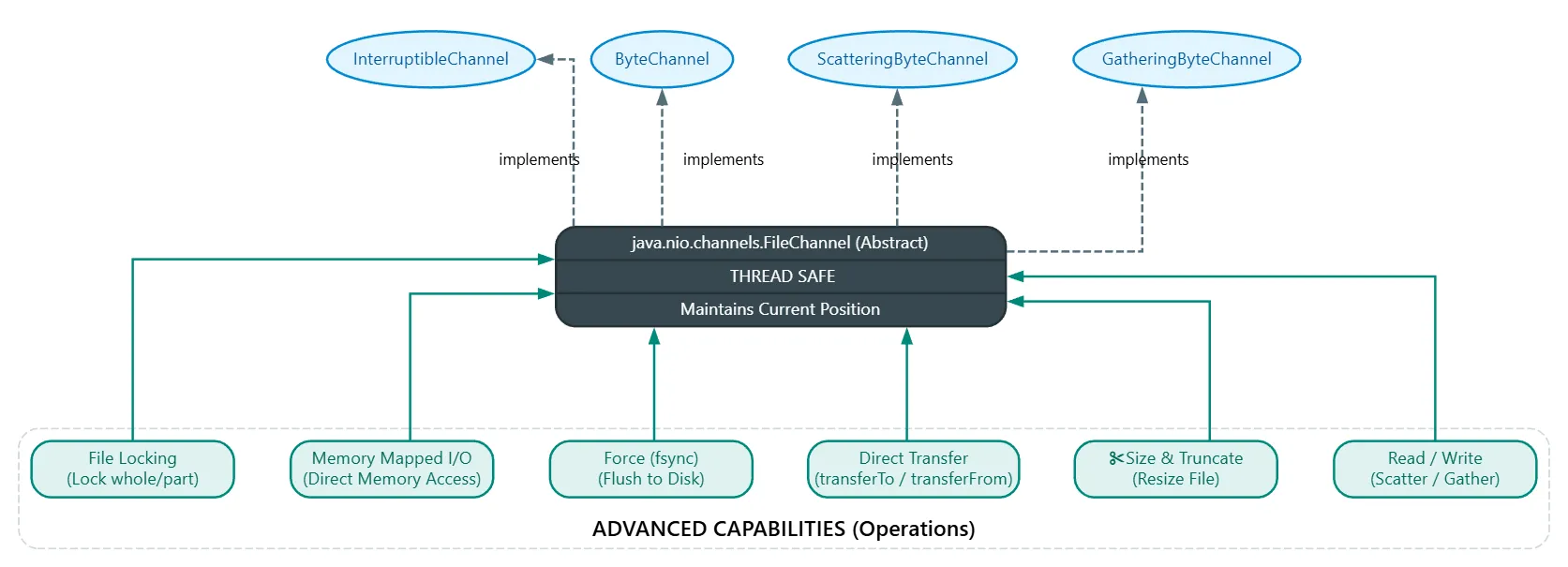
%% These are the methods of FileChannel: %%
FileChannel:
void force(boolean metadata):
Forces all updates made to this channel to be written to the storage device. When this method returns, it guarantees that all changes made to the file associated with the channel have been performed if the file is on internal storage. However, if the file is on a network file system, you might not be able to ensure changes were actually committed.
The metadata value determines whether the update should include the file's metadata, such as last modified time, last access time, file size, permissions, etc. If true, it includes them; otherwise, false.
A note here: if you set it to true and the file is open read-only, even though you didn't modify data, force() still might perform a write operation. This is because simply opening the file modifies the Last Access Time, which needs to be written to the Inode, so the OS will perform a Disk Write Operation to update the Inode. This is in contrast to passing false, where you don't care about the metadata.
This method throws ClosedChannelException if the channel is closed and IOException if any other I/O error occurs.
long position():
Returns the current file position maintained by the channel, which is zero-based.
This method throws ClosedChannelException if the File channel is closed and IOException if any other I/O error occurs.
FileChannel position(long newPosition):
This method changes the file channel's position to newPosition. newPosition is the number of bytes calculated from the beginning of the file. The position cannot be a negative value. It can be a value larger than the current file size; in that case, read attempts will return End Of File - EOF because logically there is no data there to read. However, if you decide to write, the write will succeed, but it will fill the bytes between the end of the file and the location you wrote to with unspecified bytes. The operating system considers this area a "hole" and usually fills it with zeros. In file systems like NTFS or ext4, the OS does not reserve actual disk space for this hole, just marking it as empty to save space.
This method throws java.lang.IllegalArgumentException if the offset is negative, ClosedChannelException if the file channel is closed, and IOException if any other I/O error occurs.
int read(ByteBuffer buffer):
Reads bytes from this file channel and puts them into the given buffer.
The maximum number of bytes read is the number of bytes remaining in the buffer when the method was called, and bytes are copied into the buffer starting from its current position. The call might block if other threads are trying to read from the same channel. When finished, the buffer's position is updated, and the method returns the number of bytes actually read, throwing exceptions as previously discussed in ReadableByteChannel.
int read(ByteBuffer dst, long position):
Similar to the previous method, but bytes are read starting from the given position. It throws IllegalArgumentException if the position is negative.
long size():
Returns the size of the file associated with this file channel. This method throws ClosedChannelException if the file channel is closed and IOException if any other I/O error occurs.
FileChannel truncate(long size):
Truncates the file linked to this file channel to the given size. Any bytes after the given size are deleted. If there are no bytes after the size, the file content remains unchanged.
If the current file position is larger than the size, it is set to the size.
int write(ByteBuffer buffer):
Writes a sequence of bytes to this file channel from the given buffer. Bytes are written starting from the current file position of the channel unless the channel is in append mode, in which case the position first moves to the end of the file. When writing, the file grows (if necessary) to accommodate these bytes, then the file position is updated by the number of bytes actually written. Otherwise, this method behaves exactly as specified in the WritableByteChannel interface. The method returns the number of bytes actually written and throws the same exceptions discussed previously in WritableByteChannel.
int write(ByteBuffer src, long position):
Similar to the previous method, but bytes are written starting from the given file position. It throws IllegalArgumentException if the position is negative.
The force(boolean) method achieves durability by ensuring all changes made to a file in the local file system since the last time the method was called are committed. This feature is important for critical tasks like transaction processing where you must maintain data integrity and ensure reliable recovery. However, as mentioned, this guarantee does not apply to remote file systems.
Example of using File Channels:
public static void main(String[] args) throws IOException {

    RandomAccessFile raf = new RandomAccessFile("test","rw");
    FileChannel fc = raf.getChannel();
	long pos = fc.position();
    System.out.println("Position = " + pos);
    System.out.println("size: " + fc.size());

}
What we do here is create an instance of RandomAccessFile on a file named "test" and set its mode to rw so we can read and write to it. If the file doesn't exist, a new one will be created.
We created a channel on this RandomAccessFile, and made a variable named pos where the current position of the channel will be stored, and we'll just print this pos and the size of the channel before doing anything. The expected result is:
Position = 0
size: 0
Let's try to write a sentence in this file:
String msg = "This is a test message.";
ByteBuffer buffer = ByteBuffer.allocateDirect(msg.length()*2);
buffer.asCharBuffer().put(msg);
fc.write(buffer);
fc.force(true);
System.out.println("Position = " + fc.position());
System.out.println("size: " + fc.size());
Here we created a normal msg, and a buffer with a size twice the length of the message.
We put this msg into the buffer, made the File channel write it from the buffer, and used force(true) to force the data to be written to disk. Then we print the position of the File Channel to see if the position changed and where it is now.
Don't forget to delete the old file.
The output should be:
Position = 0
size: 0
Position = 46
size: 46
And you will find the msg written in the test file. If you want to read it via buffers:
buffer.clear();
fc.position(pos);
fc.read(buffer);
buffer.flip();
while (buffer.hasRemaining())
    System.out.print(buffer.getChar());
We clear() the buffer to clean it, then change the File channel's position back to zero, then read from the file and put the data into the buffer, and flip() to read from it, using the while loop we've used many times to read data from the buffer.
If you delete the test file and run the code from the beginning, the result will be:
Position = 0
size: 0
Position = 46
size: 46
Position = 0
This is a test message.
And if you run it while the file already exists:
Position = 0
size: 46
Position = 46
size: 46
Position = 0
This is a test message.
Locking Files
The ability to lock an entire file or part of it was not available in Java until Java 1.4. this capability allows a JVM process to prevent other processes from accessing the entire file or part of it until it finishes dealing with it.
While a file can be entirely locked, it is usually better to lock a smaller region. For example, database management systems lock specific rows in a table being updated instead of locking the entire table, so read requests can still be executed, improving throughput.
Locks associated with files are called File Locks. Every file lock starts at a specific byte location in the file and has a specific length in bytes from that location; together they define the locked region. File locks allow processes to coordinate access to different regions of the file.
There are two types of File Locks: exclusive and shared.
An exclusive lock gives a single writer process access to a region and prevents any other File Locks from being applied simultaneously on that region. The purpose of this is writing; if Process A has an Exclusive Lock on a file, it is impossible for any other Process to take an Exclusive Lock so they don't write over it, and impossible for any other process to take a shared lock so they don't read incomplete data while it is still writing.
A shared lock gives access to one of several writer processes for the same region in the file. It does not prevent other shared locks but prevents an exclusive lock from being applied simultaneously to that region. So if Process A has a shared lock, it is perfectly fine for Process B and Process C to take shared locks at the same time and read together, but no one is allowed to take an Exclusive Lock as long as at least one person holds a Shared Lock. This is like public display screens; many people can stand and watch (Read) at the same time, but no one is supposed to move the screen, turn it off, or tear it down (Write) as long as people are watching.
Exclusive and shared locks are usually used in scenarios where a shared file is read frequently and updated rarely. The process that needs to read from the file takes a shared lock for the entire file or the required region. Another process that also needs to read takes a shared lock for its required region too. Both processes can read the file without interfering with each other. Suppose a third process wants to write; to do so, it will need to request an exclusive lock. This process will block until all exclusive or shared locks overlapping with its region are released.
Once an exclusive lock is granted to an updater process, any reader process requesting a shared lock will block until the exclusive lock is released. The updater process can then update the file without reader processes seeing inconsistent data.
There are two things to keep in mind when dealing with File locks:
1- Sometimes the OS doesn't support shared locks, so when you request a shared lock, it turns into an exclusive lock. Although correctness is guaranteed, performance might be affected.
2- Locks apply at the file level, not at the thread or channel level. So if multiple threads are running on the same JVM and request an exclusive lock for the same region in a file via different channels, they will get access fine. However, if threads are running on different JVMs, the second thread will block. The JVM is treated by the operating system as a single process; whether it has one, two, or ten threads inside, the OS doesn't care in the context of File locking. When you request an exclusive lock on a file, it sees that this process requested the file. If another JVM is running with a different process ID and tries to request a lock on the same file, the OS will prevent it. But if it's a thread or channel, these ultimately exist inside your JVM which was already granted access, so it is your turn to organize synchronization at that level.
The FileChannel defines 4 ways to create exclusive and shared locks:
FileLock lock(): Places an exclusive lock on the file associated with this File channel. This convenience method is equivalent to executing:
fileChannel.lock(0L, Long.MAX_VALUE, false);
This method returns ajava.nio.channels.FileLockobject representing the locked region.
It throwsClosedChannelExceptionif the file channel is closed,NonWritableChannelExceptionif the channel is not open for writing, andOverlappingFileLockExceptionif there is a lock overlapping with the requested region already held by this JVM, or if another thread is already blocked in this method trying to lock an overlapping region in the same file. It throwsjava.nio.channels.FileLockInterruptionExceptionif the calling thread is blocked waiting for the lock and is interrupted. It throwsAsynchronousCloseExceptionif the channel is closed while the calling thread is waiting for the lock, andIOExceptionfor any other problem while requesting the lock.
FileLock lock(long position, long size, boolean shared)
This method is similar to the previous one but attempts to take a lock for a specific region in this channel's file. You define the region by passing positive size and position values, and pass true for shared to request a shared lock and false for an exclusive lock.
FileLock tryLock()
Attempts to take an exclusive lock on the file associated with the file channel without blocking. This convenience method is equivalent to fileChannel.tryLock(0L, Long.MAX_VALUE, false).
This method returns a FileLock object representing the locked region, or null if this lock would overlap with an exclusive lock already held by another OS process. It throws ClosedChannelException if the file channel is closed and OverlappingFileLockException if there is a lock overlapping with the requested region held by this JVM or if another thread is already blocked in this method trying to lock an overlapping region, and IOException for any other I/O error while requesting the lock.
FileLock tryLock(long position, long size, boolean shared)
This method is similar to the previous one but attempts to take a lock on a specific region in this channel.
The lock() methods force the thread to block if the desired region is already locked, and it doesn't move until the lock is released unless both parties are requesting a shared lock, in which case it proceeds.
Meanwhile, the tryLock() methods return null immediately when the lock overlaps with an exclusive lock to let you know the attempt failed, and the program continues normally.
All methods return a FileLock instance which encapsulates the locked region in the file.
Methods of FileLock:
FileChannel channel()
Returns the File channel through whose file this lock was obtained, or null if the lock was not through a file channel.void close()
Calls therelease()method to release the lock.boolean isShared()
Returns true to specify if this lock is shared, false if it is exclusive.boolean overlaps(long position, long size)
Returns true or false to determine if this lock region overlaps with the range passed in parameters.long position()
Returns the position within the file of the first byte of the locked region. The locked region doesn't have to be within the file or even overlap with it; the value this method returns could be larger than the current file size.void release()
Releases the lock. If the lock object is valid, calling this method releases the lock and makes the object invalid. If the lock object was already invalid, calling it has no effect.long size()
Returns the length of the file lock in bytes.String toString()
Returns a string describing the range, type, and validity of this lock.
A FileLock instance is associated with a FileChannel instance, but the file lock represented by the FileLock instance is tied to the underlying file, not the File channel.
Be careful when dealing with locks as you might end up with many problems like deadlock. Therefore, always think about releasing the file lock. The pattern that should always be in your mind is:
  FileLock lock = fileChannel.lock();
  try{
	   // logic with file channel
  }
  catch (IOException ioe){
	   // handle the exception
  } finally {
	   lock.release();
  }
Mapping Files into Memory
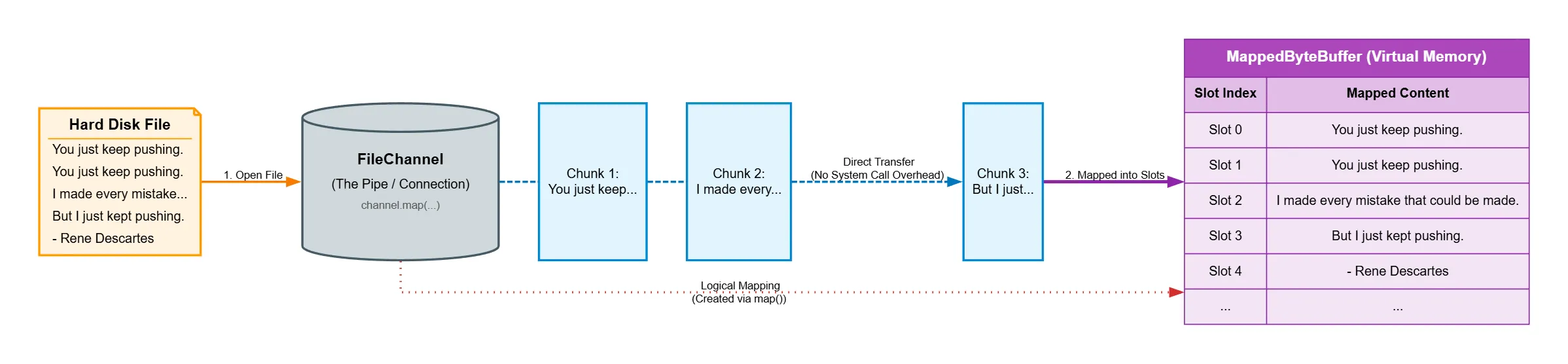
The File channel defines a map() method that allows you to create a virtual memory mapping between a region of an open file and a java.nio.MappedByteBuffer instance that wraps itself around that region.
This mapping mechanism provides an efficient way to access files because no time-consuming system calls are required to perform I/O.
MappedByteBuffer map(FileChannel.MapMode mode, long position, long size)
This is the map() method. The mode parameter defines the mapping mode and takes one of the constants defined in the FileChannel.MapMode enumerated type:
1- READ_ONLY
Any attempt to modify the buffer will throw java.nio.ReadOnlyBufferException.
2-READ_WRITE
Changes made to the resulting buffer will eventually be propagated to the file and might be visible to other programs mapped to the same file.
3- PRIVATE
Changes made to the resulting buffer will not be propagated to the file and will not be visible to other programs mapped to the same file. Instead, these changes will cause copies of the modified portions to be created in the buffer. These changes are lost when the buffer is cleared by the garbage collector.
The specified mapping mode is restricted by the access permissions of the FileChannel object that called the method. For example, if the file channel was opened as read-only and you request READ_WRITE mode, map() will throw NonWritableChannelException because it cannot write to the file channel. Similarly, NonReadableChannelException is thrown when the channel is opened as write-only and you request read-only mode (you can request READ_ONLY for a file channel opened as a Read-Write channel).
You can use the method named
isReadOnly()of theMappedByteBufferto know if you can modify the mapped file or not.
The Position and size parameters define the start and extent of the mapped region; they should be non-negative and the size value should not exceed Integer.MAX_VALUE.
The specified range doesn't necessarily have to be within the file size because the file will grow to accommodate the range. So if you pass Integer.MAX_VALUE for size, the file will grow to more than two gigabytes. Also, for read-only mapping, map() will often throw IOException.
The returned MappedByteBuffer object behaves like a memory-mapped buffer, but its content is stored in a file. When you call get() on this object, you get the current content of the file, even if this content was modified by an external program. Similarly, when you have write permission and call put(), this updates the file, and changes become available to external programs.
Because mapped byte buffers are direct byte buffers, the memory space allocated for them exists outside the JVM's heap.
MappedByteBuffer buffer = fileChannel.map(FileChannel.MapMode.READ_ONLY, 50, 100);
This code maps a subrange from location 50 to location 149 of the file described by fileChannel. In contrast, the following code maps the entire file:
MappedByteBuffer buffer =
	 fileChannel.map(FileChannel.MapMode.READ_ONLY, 0, fileChannel.size());
Once a mapping is created, it remains until the MappedByteBuffer object is cleared by the garbage collector or the application is closed. Because the mapped byte buffer is not connected to the file channel through which it was created, the mapping is not destroyed when the file channel is closed.
MappedByteBuffer inherits methods from its java.nio.ByteBuffer superclass and also declares these methods:
MappedByteBuffer load()
Attempts to load the entire mapped file content into memory. This leads to higher speed when accessing large files because the virtual memory manager doesn't have to load parts of the file into memory when those parts are requested during traveling in the mapped buffer.load()might fail because external programs might cause the virtual memory manager to remove parts of the loaded file content to make room for their content in physical memory. Moreover, it can be costly in terms of time because it might make the virtual memory manager perform a lot of I/O, and this method takes time to finish.boolean isLoaded()
Returns true when the entire content of the mapped file has been loaded into memory; otherwise, returns false.
If it returns true, you can likely reach all content with few or no I/O operations. If it returns false, it is still possible that access to the buffer is fast and the mapped content is in memory, soisLoaded()serves as a hint for the state of the mapped byte buffer.MappedByteBuffer force()
Forces changes made to the mapped byte buffer to be written to permanent storage.
When dealing with mapped byte buffers, you must call this method instead of theforce()method of the File channel because the channel might be unaware of various changes made through the mapped byte buffer.
Calling this method has no effect on
READ_ONLYandPRIVATEmappings.
Let's make an example to simplify things: we will read data from a file and display it.
public static void main(String[] args) throws IOException {

    RandomAccessFile raf = new RandomAccessFile(args[0], "rw");
    FileChannel fc = raf.getChannel();
    long size = fc.size();
    System.out.println("size: "+size);

    MappedByteBuffer mbb = fc.map(FileChannel.MapMode.READ_WRITE,0, size);
    while (mbb.remaining() > 0)
        System.out.print((char) mbb.get());
    System.out.println();

}
What this code does is create a RandomAccessFile on a file we will pass to the program from the command line in read-write mode. Then we create a file channel on this file named fc. We first print its size to know if the file contains data; if the file doesn't exist, it will be created and the size will be 0.
Then we create a buffer of type MappedByteBuffer and link it to the file channel named fc. The map mode will be READ_WRITE and will start from 0 to the size.
And like any buffer we dealt with, we will loop as long as there is data inside and print it.
I made a file named quote and put this text in it:
You just keep pushing.
You just keep pushing.
I made every mistake that could be made.
But I just kept pushing.
- Rene Descartes
When I run it:
java Main.java quote
The result will be:
size: 132
You just keep pushing.
You just keep pushing.
I made every mistake that could be made.
But I just kept pushing.
- Rene Descartes
Let's play more and shuffle and reverse the file. We will just add this:
for (int i = 0; i < mbb.limit()/2; i++) {
    byte b1 = mbb.get(i);
    byte b2 = mbb.get(mbb.limit()-i-1);
    mbb.put(i,b2);
    mbb.put(mbb.limit()-i-1,b1);
}
mbb.flip();
while (mbb.remaining() > 0)
    System.out.print((char) mbb.get());
We will loop until the middle of the file.
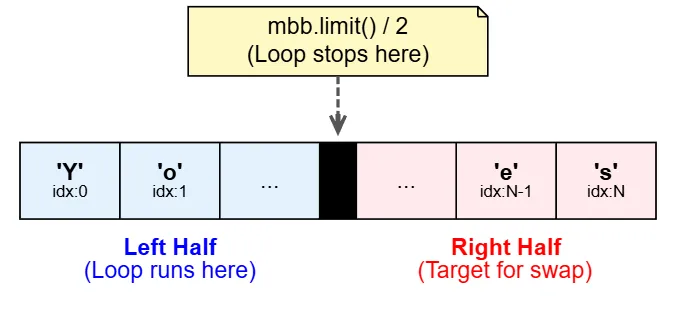
And we won't use the buffer's position here; we'll use indexes. First, we create a byte named b1 to hold the byte from the left side (the beginning). Then we create a byte to get the corresponding byte from the right side (the end) by subtracting the current index and -1 from the limit because indexes start from 0.
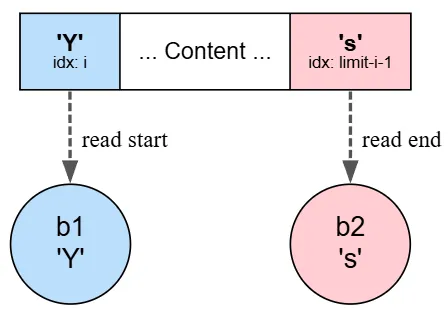
Then in mbb.put(i,b2), we take the second byte and write it in place of the i we are standing on.
And mbb.put(mbb.limit()-i-1,b1) takes the first byte and writes it in place of the byte on the right side. We are performing a swap.
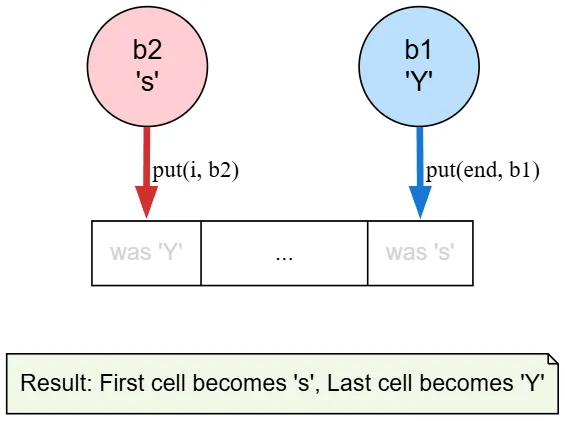
Then you perform flip so we read from the buffer and the result will be as follows:
size: 132
You just keep pushing.
You just keep pushing.
I made every mistake that could be made.
But I just kept pushing.
- Rene Descartes
setracseD eneR -
.gnihsup tpek tsuj I tuB
.edam eb dluoc taht ekatsim yreve edam I
.gnihsup peek tsuj uoY
.gnihsup peek tsuj uoY
As you see, the text is shuffled and reversed, and you will find the file content itself became shuffled and reversed.
Transferring Bytes Between Channels
The last thing we will talk about is how to transfer bytes between channels to improve bulk transfers.
Two methods were added to FileChannel that make us not need intermediate buffers:
long transferFrom(ReadableByteChannel src, long position, long count)
This transfers bytes to this channel's file from theReadableByteChannelyou provide. Thesrcparameter defines the source channel,positiondefines the starting point in the file where the transfer will begin, andcountdefines the maximum number of bytes to be transferred.
This method returns the number of bytes actually transferred, which could be 0. It throwsIllegalArgumentExceptionwhen a precondition on a parameter is not met (e.g., if you set a negative position). It throwsNonReadableChannelExceptionwhen the source channel is not open for reading,NonWritableChannelExceptionwhen the current channel is not open for writing,ClosedChannelExceptionwhen our channel or the source channel is closed, andClosedByInterruptExceptionwhen another thread interrupts the current thread while the transfer is running (this closes both channels and changes the interrupt status of the current thread). This method also throwsIOExceptionfor any other I/O error.long transferTo(long position, long count, WritableByteChannel target)
This transfers bytes from this channel's file to theWritableByteChannelyou provide. Thepositionparameter defines the starting point in the file where the transfer will begin,countdefines the maximum number of bytes to be transferred, andtargetdefines the target channel.
The method returns the number of bytes actually transferred and throwsIllegalArgumentExceptionwhen a precondition on a parameter is not met. It throwsNonReadableChannelExceptionwhen this channel is not open for reading,NonWritableChannelExceptionwhen the target channel is not open for writing,ClosedChannelExceptionwhen our channel or the target channel is closed, andClosedByInterruptExceptionwhen another thread interrupts the current thread while the transfer is running (this closes both channels and changes the interrupt status of the current thread). This method also throwsIOExceptionfor any other I/O error.
If you usetransferFrom()with a file channel as a transfer source, the transfer stops at the end of the file whenposition + countexceeds the file size. That is, if you request an amount of data larger than what actually exists in the file, the program won't hang or send random data. For example, if you have a 100-byte file and you wanted to read 50 bytes starting from byte 90, it won't reach 140 (which doesn't exist) because the file is only 100; it will stop at 100 and return 10 instead of 50.
This is an example of how to use channel transfer to move content from one file to another:
public static void main(String[] args) throws IOException {
    try {
        FileInputStream fis = new FileInputStream(args[0]);
        FileChannel inChannel = fis.getChannel();
        WritableByteChannel outChannel = Channels.newChannel(System.out);
        inChannel.transferTo(0,inChannel.size(),outChannel);
    }catch (IOException e){
        System.err.println(e.getMessage());
    }
}
First, we created a FileInputStream to open the file we will pass in the command line and made a file channel named inChannel. We made a WritableByteChannel named outChannel on System.out to send the bytes to the standard output stream. We call transferTo to start transferring from the first byte of the file, moving a number of bytes equal to the entire file size inChannel.size(), and putting this data into outChannel.
If you run this script, you will find it transferred the contents of the quote file to another file.
java Main.java quote > quote.txt