 Seth0x41
What are Buffers?
Buffers are objects that store a specific amount of data to be sent to a part of the operating system responsible for Input/Output operations (I/O Service) or to receive data from it.
The Buffer sits between the application and the channel that writes the buffered data to the service, or reads the data and puts it into the buffer.
There are four fundamental properties of buffers:
- Capacity: The capacity of elements that can be stored in the buffer. This is determined when the buffer is created and cannot be changed afterward.
- Limit: An index (starts at 0) that determines the number of data elements available in the buffer; meaning the first element that should not be read or written.
- Position: The index (starts at 0) of the next element to be read or the location where the next element will be written.
- Mark: An index starting at zero. It is the position in the buffer that will be returned to when calling the
reset()method. Thereset()is not defined initially.
The relationship between these four properties is as follows:
The following image shows a newly created buffer dealing with bytes, with a capacity of 7:
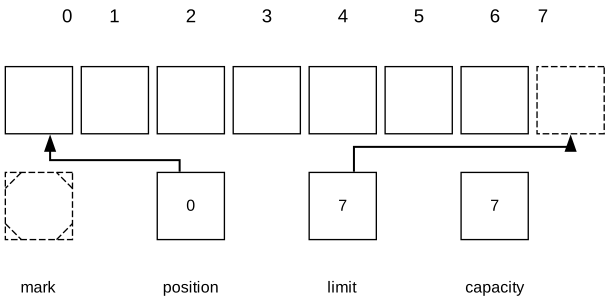
This image shows a buffer that can hold a maximum of 7 elements. The mark is initially undefined, the position starts at 0, and the limit is initially set to the capacity, which determines the maximum number of bytes that can be stored. You can access locations from 0 to 6 only in this buffer; number 7 is outside the bounds of this buffer.
The Buffer and Derived Classes
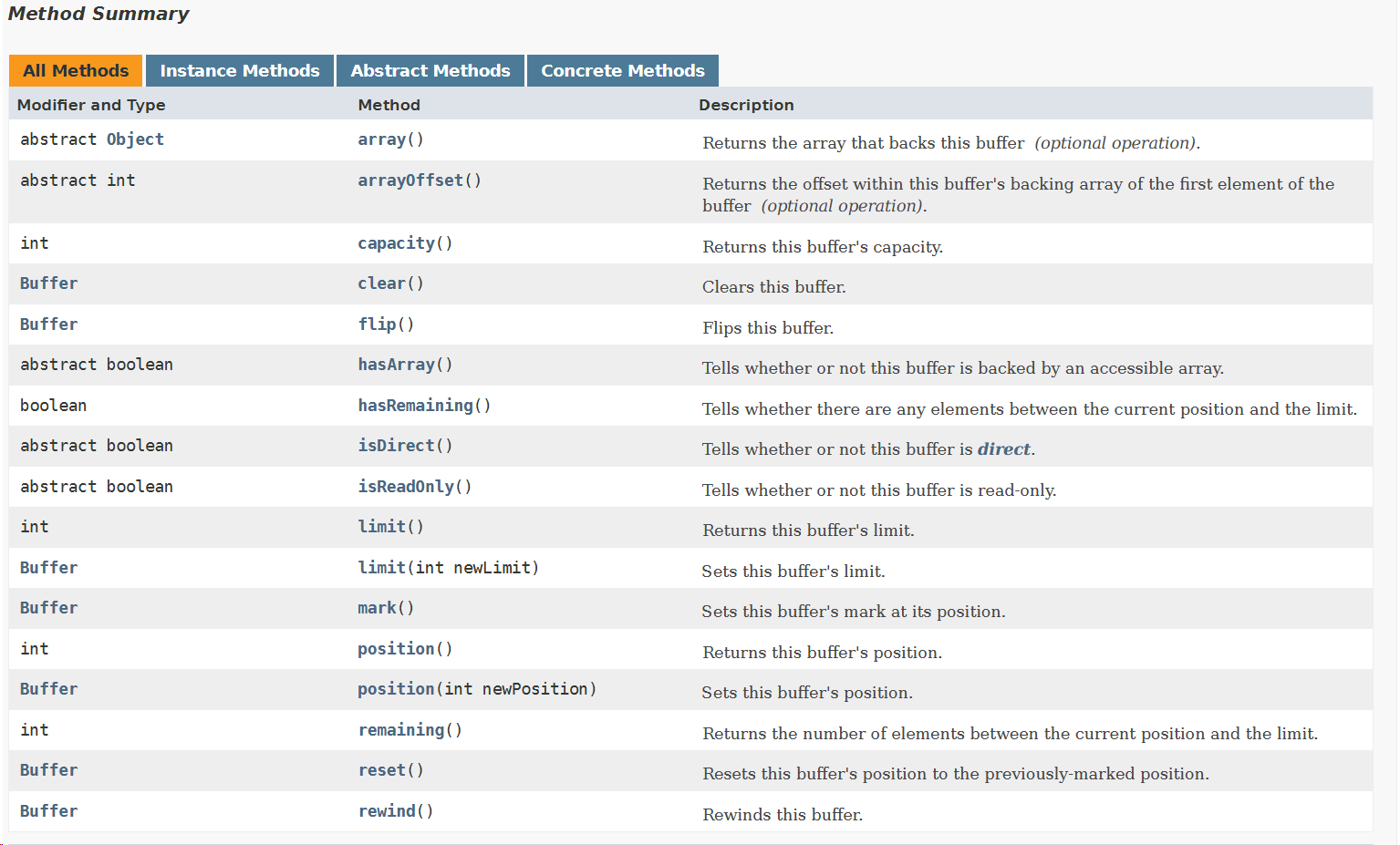
Buffers are implemented via classes that inherit from the abstract class named java.nio.Buffer. These are the methods of the Buffer Class.
Object array():
This returns the array backing this buffer. The method is intended to allow buffers backed by arrays to be passed to native code more efficiently. Concrete subclasses override this method and return covariant return types.
This method throws java.nio.ReadOnlyBufferException if the buffer is backed by an array but is read-only, and throws java.lang.UnsupportedOperationException if the buffer is not backed by an accessible array.
int arrayOffset():
Returns the offset of the first element in the buffer within the backing array. When the buffer is backed by an array, the position in the buffer corresponds to the array index resulting from:
or
Example:
byte[] arr = {10, 20, 30, 40, 50, 60};

ByteBuffer buf = ByteBuffer.wrap(arr, 2, 3);

// arrayOffset = 2
// capacity = 3
// position = 0
First step: Before reading
Array indices:   0   1   2   3   4   5

Array values:   10  20  30  40  50  60
                         ^
                         | arrayOffset = 2 (start of buffer)

Buffer indices:  0   1   2
Buffer values:  [30][40][50]
Position (p):   ^
Calculation:
array index = position + arrayOffset = 0 + 2 = 2
arr[2] = 30
Second step: After reading one element:
byte x = buf.get(); // position++
Array indices:   0   1   2   3   4   5
Array values:   10  20  30  40  50  60
                             ^
                             | arrayOffset = 2
Buffer indices:  0   1   2
Buffer values:  [30][40][50]
Position (p):       ^
Calculation:
array index = position + arrayOffset = 1 + 2 = 3
arr[3] = 40
Third step: After reading two elements:
byte y = buf.get(); // position++
Array indices:   0   1   2   3   4   5
Array values:   10  20  30  40  50  60
                                 ^
                                 | arrayOffset = 2
Buffer indices:  0   1   2
Buffer values:  [30][40][50]
Position (p):           ^
Calculation:
array index = position + arrayOffset = 2 + 2 = 4
arr[4] = 50
To ensure the buffer has an available array or not while using this method, call hasArray().
This method throws exceptions similar to array() mentioned above in cases of read-only and lack of a backed array.
int capacity():
Returns the capacity of this buffer.
Buffer clear():
Clears the buffer. The Position is set to 0, the limit is set to the capacity, and the mark is discarded.
This method does not actually clear the data from the buffer.
Buffer flip():
Flips the Buffer. The limit is set to the current position, then the position is set to 0. If a mark is defined, it is discarded.
boolean hasArray():
Returns true if this buffer is backed by an array and is not read-only; otherwise, returns false.
When this method returns true, you can safely call array() and arrayOffset().
boolean hasRemaining():
Returns true if there is at least one element remaining in the buffer, meaning between the current position and the limit; otherwise, returns false.
boolean isDirect():
Returns true if this buffer is a direct byte buffer; otherwise, returns false.
boolean isReadOnly():
Returns true if this buffer is read-only; otherwise, returns false.
int limit():
Returns the limit of the buffer.
Buffer limit(int newLimit):
Sets the buffer's limit to newLimit. If the mark is defined and larger than newLimit, it is discarded.
This method throws java.lang.IllegalArgumentException if newLimit is negative or larger than the capacity.
Buffer mark():
Sets the buffer's mark at the current position, and returns the buffer.
int position():
Returns the current position of the buffer.
Buffer position (int newPosition):
Sets the buffer's position to newPosition. If the mark is defined and larger than newPosition, it is discarded.
This method throws java.lang.IllegalArgumentException if newPosition is negative or larger than the current limit.
int remaining():
Returns the number of elements remaining between the current position and the limit.
Buffer reset():
Resets the buffer's position to the location previously marked by the mark.
This method does not change or discard the mark value. It throws java.nio.InvalidMarkException if the mark was not set.
Buffer rewind():
Rewinds the buffer to the beginning. The Position is set to 0 and the mark is discarded.
You will notice that many methods return a reference to the same buffer to make it easier for you to chain methods one after another, like this:
buf.mark().position(2).reset();
You will also notice that all buffers can be read from, but not all can be written to, otherwise a ReadOnlyBufferException will be thrown. Call isReadOnly() if you want to make sure whether you can write to this buffer or not.
Important: Buffers are not thread-safe. You must handle synchronization yourself if you want to access a buffer from more than one thread.
There are several abstract classes that extend Buffer, one for each primitive type except boolean, such as:
ByteBuffer, CharBuffer, DoubleBuffer, FloatBuffer, IntBuffer, LongBuffer, ShortBuffer.
The I/O operations performed by the OS consist of bytes. These primitive types allow you to create something called
view buffersso you can perform this I/O from the perspective of characters, integers, doubles, and so on, but in reality, it is all a byte stream.
Buffer Creation
The ByteBuffer and other primitive types provide class methods to create the type of buffer you want. For example, ByteBuffer:
ByteBuffer allocate (int capacity):
Allows you to allocate a new byte buffer with the capacity you send to it. The position becomes 0, the limit becomes equal to the capacity, the mark is undefined, and every element starts with a value of 0. It also has a backing array and its offset is 0.
The method throws IllegalArgumentException if the capacity is negative.
ByteBuffer allocateDirect (int capacity):
Allocates a new direct byte buffer, which we will talk about at the end. It allocates it with the capacity you send, the position becomes 0, the limit becomes equal to the capacity, the mark is undefined, and every element starts with a value of 0. However, it is not determined whether it has a backing array or not, and it throws the same Exception as allocate.
Before JDK 7, direct buffers allocated by this method were page-aligned in memory. In JDK 7, the implementation changed, and direct buffers are no longer necessarily page-aligned. This is supposed to reduce memory consumption for applications that create small buffers.

REF: https://docs.oracle.com/javase/7/docs/technotes/guides/io/enhancements.html#7
This diagram illustrates page-aligned before and after.

ByteBuffer wrap (byte[] array)::
Wraps a byte array inside the buffer. The new buffer is backed by this array, meaning any modification in the buffer will change the array and vice versa. The buffer capacity and limit will be the same as the array.length, the position becomes 0, the mark is undefined, and the array offset becomes 0.
ByteBuffer wrap (byte[] array, int offset, int length)::
Wraps a byte array inside the buffer, but you specify a part of it. The capacity remains the length of the entire array, but the position starts from the offset, and the limit becomes .
This method throws java.lang.IndexOutOfBoundsException if the offset or length values are not valid regarding the array length.
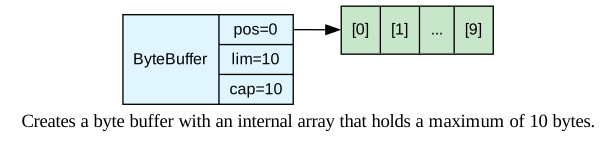
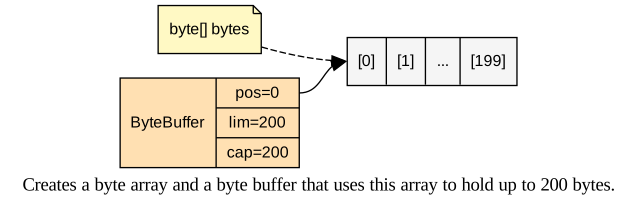
The ways we talked about are two ways that let you create a byte Buffer: either by giving it the backed array or letting it create it itself.
ByteBuffer buffer = ByteBuffer.allocate(10); // Creates the array itself
        byte[] bytes = new byte[200];
        ByteBuffer buffer2 = ByteBuffer.wrap(bytes); // Passed the array above
buffer = ByteBuffer.wrap(bytes, 10, 50);
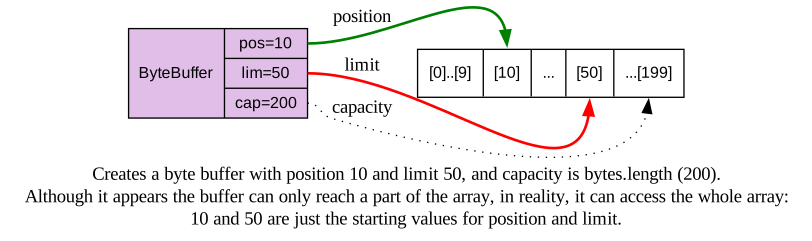
Buffers created via allocate() or wrap() are considered Nondirect byte buffers (we said we would talk about them at the end), but what you need to know is that they have backing arrays, and you can access these arrays via the array() method as long as hasArray() returns true.
Don't forget to call
arrayOffset()ifhasArray()returnstrueto know the location of the first element in the array.
Just as buffers can manage elements stored in external arrays via wrap(), they can also manage data stored in other buffers.
When you create a buffer that manages data of another buffer, this second buffer is called a view buffer, and any change that happens in either one is reflected in the other.
View buffers are created by calling the duplicate() method from the subclass of the buffer. The resulting view buffer is equivalent to the original buffer; they share the same elements and have the same capacity, but each has its own position, limit, and mark. If the original buffer was read-only or direct, the view buffer will be read-only and direct.
Note that: Both are different objects, but they share the same backing array.
Buffers can also be created by calling one of the asXBuffer() methods in the ByteBuffer class. Like the ones in the image below:
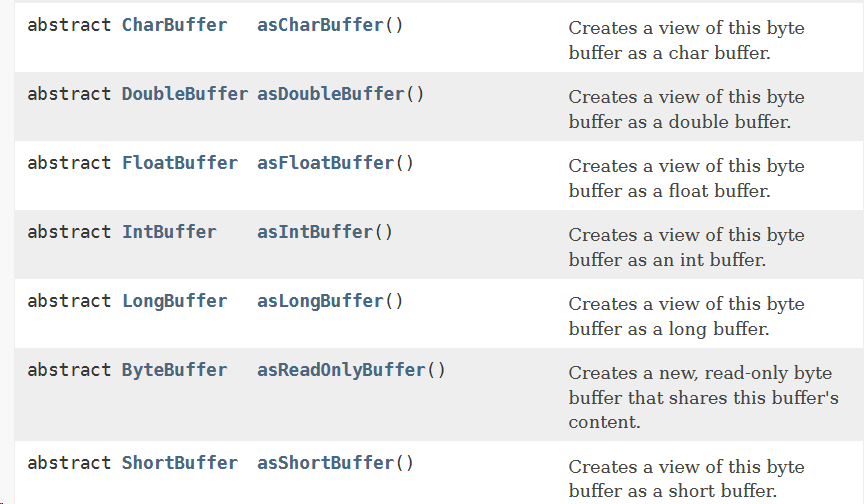
These will return a view buffer that treats the byte buffer as if it were a buffer of that type.
You can use asReadOnlyBuffer() to make the view buffer read-only, and any attempt to write to it will throw ReadOnlyBufferException.
Reading and Writing from buffers
ByteBuffer and other Classes provide overloading for methods like get() and put() to write to the buffer or read from it. These methods can be one of two things:
-
Absolute:
This is when it asks you for an index, like:
ByteBuffer put(int index, byte b):
This stores the byte named b in the location specified by the index sent with it.
byte get(int index):
This retrieves the byte at the sent index.These methods throw
IndexOutOfBoundsExceptionif the index is negative or greater than or equal to the buffer's limit. -
Relative:
This is when it doesn't ask you for an index, so it puts or gets values from the current position, like:
ByteBuffer put(byte b):
This is to store byte b in the buffer at the current position and then increment the position.
This method throwsjava.nio.BufferOverflowExceptionif the current position is greater than or equal to the limit.
byte get():
This is to retrieve the byte at the current position and increment the position.
This method throwsBufferUnderflowExceptionif the current position is greater than or equal to the limit.
And put(), whether absolute or relative, throws ReadOnlyBufferException if the buffer is read-only.
There are other types of overrides for get() and put() that we didn't talk about, like if you want to put a bulk of data, etc. You will find them in the documentation here:
https://docs.oracle.com/javase/8/docs/api/java/nio/ByteBuffer.html
Example:
public static void main(String[] args) {
    ByteBuffer buffer = ByteBuffer.allocate(10);
    System.out.println("Capacity = " + buffer.capacity());
    System.out.println("Limit = " + buffer.limit());
    System.out.println("Position = " + buffer.position());
    System.out.println("Remaining = " + buffer.remaining());
    buffer.put((byte) 10).put((byte) 20).put((byte) 30);
    System.out.println("Capacity = " + buffer.capacity());
    System.out.println("Limit = " + buffer.limit());
    System.out.println("Position = " + buffer.position());
    System.out.println("Remaining = " + buffer.remaining());
    for (int i = 0; i < buffer.position(); i++)
        System.out.println(buffer.get(i));
}
The Result will be like this:
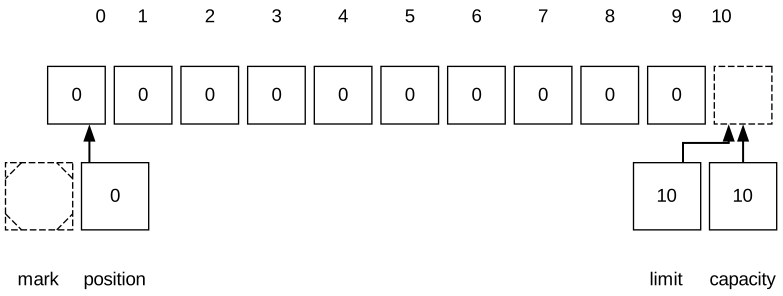
Capacity = 10
Limit = 10
Position = 0
Remaining = 10
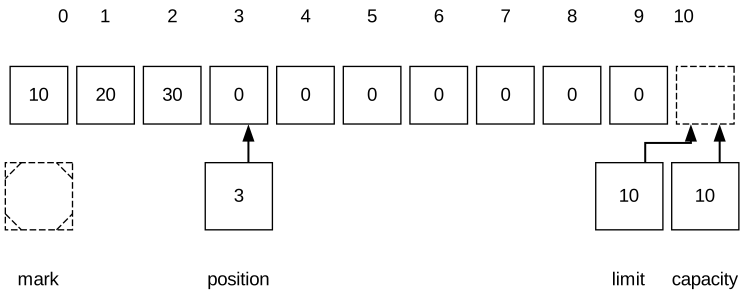
Capacity = 10
Limit = 10
Position = 3
Remaining = 7
10
20
30
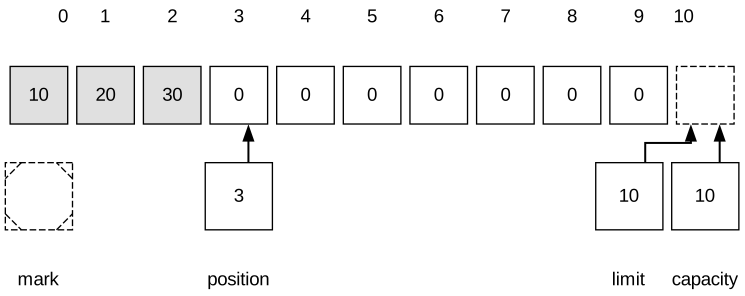
This is the state at the moment of creating ### allocate(10) :
After adding data put(10), put(20), put(30)
After reading get(i)
Flipping Buffers
After filling the buffer, we must prepare it so channels can drain data from it. If you sent the buffer as is, the channel would try to access undefined data after the current position. To solve this problem, you could return the position to 0, but then another problem arises: how will the channel know that the entered data has finished? The solution is to use the limit property because we know it determines the end of the active part in the buffer. So, we set the limit to the current position, then return the position to 0.
We can do this by:
buffer.limit(buffer.position()).position(0);
There is an easier way to do this, which is to perform flip():
buffer.flip();
In both cases, the buffer will be ready for you to drain data from it.
This is the shape of the buffer after you flip() it:
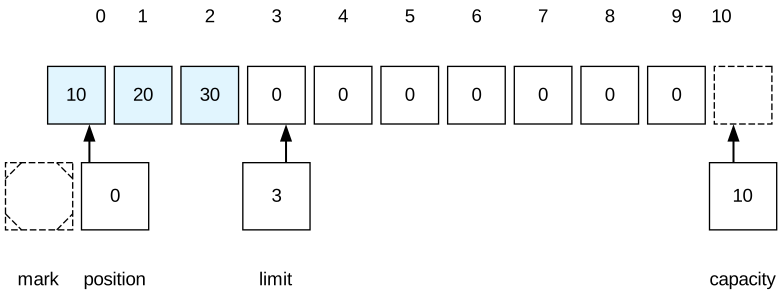
If you call buffer.remaining() now, it will return 3. These values represent the bytes still available in the buffer for draining (10, 20, 30).
Example of writing characters in a Character Buffer and reading from it:
public static void main(String[] args) {


String[] poem = {

        "El sa7 El Da7 Embo",
        "Edy El wad La Abo",
        "Ya 3eny El Wad By3yat",
        "4el El wad Mn El 2rd",
        "El Wad 3t4an Es2o"
};

CharBuffer buffer = CharBuffer.allocate(50);
for(int i = 0; i < poem.length;i++){
    for(int j =0; j < poem[i].length();j++)
        buffer.put(poem[i].charAt(j));
    buffer.flip();
    while (buffer.hasRemaining())
        System.out.print(buffer.get());
    buffer.clear();
    System.out.println();
	}
}
El sa7 El Da7 Embo
Edy El wad La Abo
Ya 3eny El Wad By3yat
4el El wad Mn El 2rd
El Wad 3t4an Es2o
rewind()is likeflip()but ignores the limit. Also, if you callflip()twice in a row, it won't return you to the original state, but the buffer size will become zero.
Marking Buffers
When you call the mark() method at a specific position in the buffer, it's like you created a bookmark for this location. You mark this place so you can return to it when you perform reset().
See this example:
 buffer = ByteBuffer.allocate(7);
 buffer.put((byte) 10).put((byte)20).put((byte) 30).put((byte) 40);
 buffer.limit(4);

The position and limit are now set to 4 as shown in the code and image.
Let's assume we did:
buffer.position(1).mark().position(3);
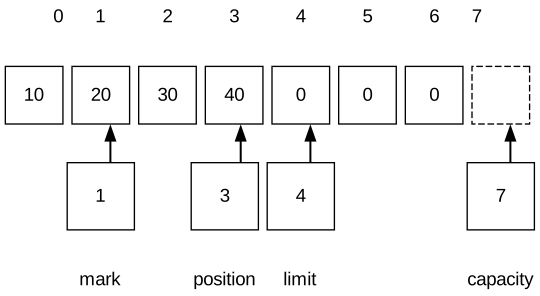
As is clear in the image, the mark is set at 1. If you sent this buffer to a channel, byte number 40 is the one that will be sent because the current position points to index number 3 and the position will move to 4.
If you subsequently performed buffer.reset() and sent the buffer to the channel, the position would return to the mark, which is 1, and bytes number 20, 30, and 40 would be sent to the channel in that order.
Some Subclasses for Buffer
The Compact Method
Imagine you have a buffer and you filled it with data, and performed flip() to read from it. You read some data but there are still remaining bytes unread, and suddenly you decided that you need to write new data into this buffer without deleting these remaining bytes. In this case, if you perform clear(), you will erase everything, and if you continue reading, you won't be able to write. This is where compact() comes in:
First, compact takes the remaining bytes and shifts them to the very beginning of the buffer. Then, it prepares the buffer for writing again, but starts writing after the data that was shifted.
Imagine we have a buffer with a capacity of 6, containing the letters of the word AHMED which is 5 letters. We read the first two letters which are AH and we are left with MED.
So the state is now as follows:
Index:    0   1   2   3   4   5
Data:   | A | H | M | E | D |   |
          ^       ^           ^
          |       |           |
     (Old Data) Position    Limit
     (Read)     (Start of
                 remaining)

Capacity: 6
Position: 2 (Standing at letter M)
Limit: 5 (Last written data)
Now we want to remove A and H from the buffer and bring M, E, D to the beginning and prepare the buffer so we can write new data after them.
When we perform compact(), the JVM will calculate the number of remaining bytes:
In our case , which are M, E, D.
It will start copying them to index 0:
Now the buffer is ready for writing, after the old data moved to the beginning, and the position became 3 to start writing after the old data finished, and the Limit went back to 6 at the end of the Capacity because you are allowed to fill the buffer to the end.
Index:    0   1   2   3   4   5
Data:   | H | A | M | ? | ? |   |
                      ^           ^
                      |           |
                   Position     Limit
                  (Ready to    (Capacity)
                   Write)
Comparison
Sometimes you need to compare two buffers to see if they are equal or not, or for sorting. All buffer subclasses except MappedByteBuffer override the compareTo() and equals() methods to perform comparisons, while MappedByteBuffer inherits these methods from the ByteBuffer class.
                System.out.println(bytBuf1.equals(bytBuf2));
                System.out.println(bytBuf1.compareTo(bytBuf2));
The conditions for equals() to say that Buffer A equals Buffer B are 3 that must all be met:
- Same Type: You cannot compare
ByteBufferwithCharBuffer; both must be Instances of the same class. - Same number of Remaining Elements: Meaning the data remaining in both (the Active Window) must be equal, so this equation is satisfied .
- Identical Sequence: The content inside the active window is identical byte by byte regardless of the Position they started from. Meaning if the first Buffer starts from index 0 and the second starts from index 50 but they contain the same content, they are equal.
Example:
Buffer A:
	Index:    0   1   2   3   4   5   6   7   8   9
	Data:   | . | . | . | . | X | Y | Z | . | . | . |
	                          ^           ^
	                          |           |
	                       Position     Limit

Capacity: 10
Position: 4
Limit: 7
Remaining: 3 bytes (Which are X, Y, Z)
Buffer B:
	Index:    0   1   2   3   4
	Data:   | X | Y | Z | . | . |
	          ^           ^
	          |           |
	       Position     Limit


Capacity: 5
Position: 0
Limit: 3
Remaining: 3 bytes (Also X, Y, Z)
The two are equal because:
- Both are
ByteBuffer. - The number of Remaining is 3 in both.
- The first element in the active window in the first buffer, which is 4, has the value
X, and in the second Buffer, the first element in the active window, which is 0, has the value X, and both equal each other. The rest of the elements follow the same pattern, despite the difference in Position in each one.
As for compareTo(), we use it for sorting, and it works in a Lexicographical (alphabetical) way.
What it does is iterate Byte by Byte within the range of Remaining Elements.
It compares the first Byte of the first Buffer and the first Byte of the second Buffer via Byte.compare(b1, b2).
- If they are different, it returns the result immediately.
- If they are equal, it moves to the next Byte.
- In a special case where one finishes before the other because its number of elements is smaller, they were identical up to that moment, the shorter Buffer is considered the smaller one and comes first in order.
Operations in
compareTo()depend entirely on the current position and limit, so if you change the position and go back to compare, the result will be completely different.
Direct Byte Buffers
Byte Buffers are the only ones among all types of Buffers that can work as Sources or Targets for I/O Operations that take place through Channels. The reason behind this is the nature of Operating Systems themselves, because when the OS performs I/O, it deals with memory areas that are a contiguous sequence of Bytes, with a unit size of 8-bits, and does not deal with Integers or complex Objects.
Theoretically, the OS has the ability to access the Address Space of the JVM Process and transfer data
Note: This article has been translated by AI from the original Arabic article. If you notice any mistakes, please inform me.